AI Tutor
She has already readyour notes.
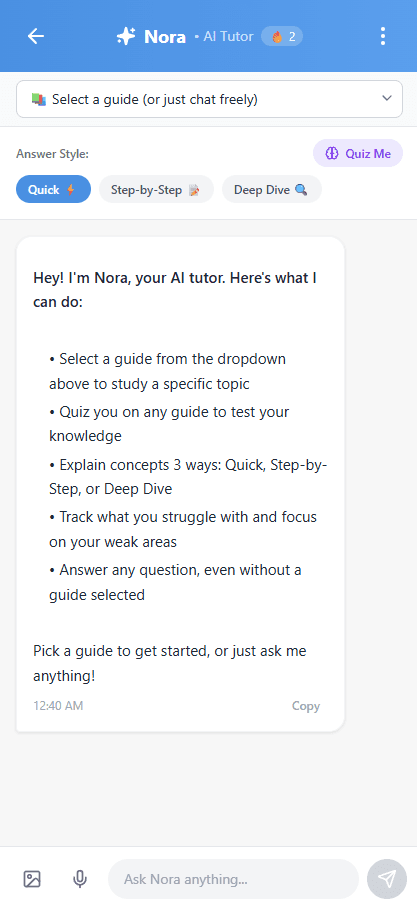
Nora is the AI tutor built inside Norsha Notes. She knows your flashcards, your weak spots, your glossary terms, everything you uploaded. Not a generic chatbot. Your actual study material, on demand.
Try Nora free ←Why I built her
The thing ChatGPT couldn't do
When ChatGPT came out I was in my senior year of high school. I started using it constantly when I studied, checking if an answer was right, asking it to explain things I didn't understand. It was clearly useful. But every single conversation started from zero. It didn't know what I got wrong last week. It didn't know what I was struggling with. Every session I had to re-explain everything from scratch.
I named her Nora because it sounds smart and it's close to Norsha. But more than that, I wanted her to feel like a person, not a tool. Someone who actually remembers you. Someone who knows that you've been stuck on the same concept for two weeks and adjusts how she explains things because of it.
That's what separates Nora from everything else. She's not a blank slate you refill every session. She builds a picture of how you learn and gets more accurate about you the longer you use her.
Click to expand
The honest comparison
Why not just use ChatGPT?
Good question. Here's the honest answer.
| ChatGPT | Nora | |
|---|---|---|
| Knows your notes | You paste them in every time | Already read everything you uploaded |
| Remembers what you got wrong | Blank slate every chat | Tracks your mistake history over time |
| Quizzes you on your material | Generic questions | MCQ, True/False, Fill-in from your actual notes |
| Works inside your study session | Different tab, different app | Built into every flashcard and study guide |
| Knows your weak flashcards | No | Tied to your spaced repetition data |
| Builds a profile of how you learn | No | Gets smarter the more you use her |
| Remembers past sessions | No | Saves last 30 messages per guide |
ChatGPT is a conversation tool. Nora is a study tool. The difference is that she was built around your learning, not a blank slate you refill every session.
Answer Modes
One tap. The exact answer you need.
When you're using AI to study, you usually want one of a few different things. Sometimes you just need the quick definition. Sometimes you need someone to walk you through it step by step. Sometimes you need the full deep explanation. And sometimes you just want to be tested on it.
With regular AI you have to prompt it specifically every time to get each of those. Anyone who uses AI a lot knows that specific prompts get specific results. I just built that in. You pick the mode once and every answer comes back in exactly that format without you having to think about how to ask for it.
There are three modes. Quick gives you the straight answer in one or two sentences. Step-by-Step walks you through the concept in numbered stages so nothing gets skipped. Deep Dive gives you the full thorough explanation when you really need to understand something, not just remember it.
Worth knowing
The mode you pick stays set until you change it. So if you're in a deep study session and want everything explained in full, set it to Deep Dive once and every answer comes back that way.
Quiz Me
Test yourself without leaving the chat
The Quiz Me feature is different from the formal Test Mode. Instead of sitting down for a full practice exam, you just ask Nora to quiz you in the chat and she starts asking you questions right there. Multiple choice, true/false, fill-in-the-blank, all generated from your actual notes.
You answer, she tells you if you're right, explains why, and moves to the next question. It's more like a back-and-forth with a tutor than a formal test. And because she knows your weak areas from your flashcard history and your test scores, she doesn't quiz you randomly. She focuses on the things you've been getting wrong.
It's the fastest way to do a quick knowledge check without the pressure of a full test. Five minutes before class, ten minutes on the bus, wherever.
Suggestions
She already knows what to ask
When you open Nora, she doesn't just wait for you to think of a question. She surfaces suggestions based on what's in your notes and what you've been struggling with. Things like "explain this concept from your last session" or "you got this question wrong twice, want to go over it?"
It removes the blank page problem. A lot of students open an AI tool and then don't know what to ask. Nora gives you a starting point every time based on your actual material.
How she knows you
What Nora tracks over time
Every feature in Norsha Notes feeds Nora. The more you use the app, the more accurate she gets about you specifically.
Session memory
Saves your last 30 messages per study guide so sessions persist across days.
Cross-guide awareness
Can see all your uploaded guides, not just the one you're currently in.
Mistake tracking
Every wrong test answer is logged. She knows what you keep getting wrong.
Flashcard data
Tied to your spaced repetition data. She knows which cards keep coming back.
Explain history
Every time you tapped Explain on a key idea, she logged it.
Learner profile
Gets smarter about how you study the longer you use her.
Nora in action
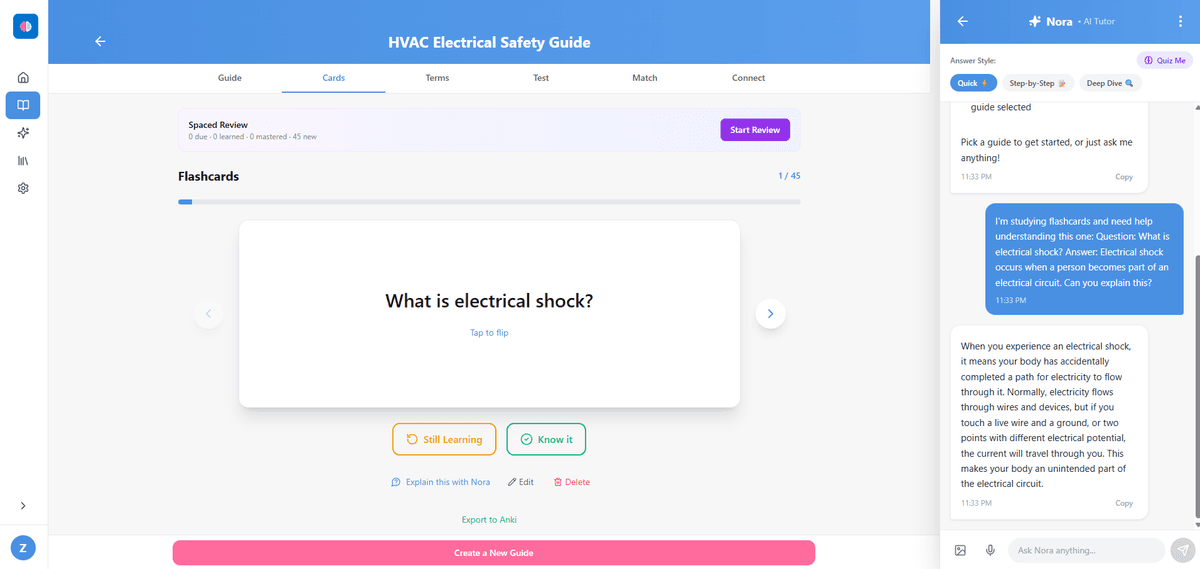
One tap. Full explanation. Zero copy-pasting.
This is what it looks like when a student is reviewing flashcards and hits the Explain button. Nora slides up from inside the card. No new tab. No pasting anything anywhere. The explanation is grounded in the specific notes that student uploaded, not a generic textbook answer.
That's the thing I wanted to get right from the start. The best AI tutor in the world is useless if it's three steps away from where you're actually studying. Nora is always one tap away from wherever you are in the app.
Click to expand
How you talk to her
Type, talk, or show her a photo
You can talk to Nora three ways. Type a question the normal way. Use voice input and just ask out loud, it uses Chrome's built in Web Speech API so nothing gets sent to a third party, it's all processed in your browser. Or upload a file, a photo of a whiteboard, a textbook page, a diagram from your notes, and ask her about it.
The file upload came from students who were taking photos of their professor's whiteboard mid-lecture and then wanting to ask questions about it later. Now you can just drop the file directly into the chat and ask whatever you need.
Worth knowing
Voice input works in Chrome on desktop and Android. It's browser-native so nothing is sent to any external server. The audio is processed locally and only the transcript gets sent to Nora.
Something not right?
I'm not a big company. It's just me.
I'm a 21 year old who was once in exactly your position as a student. I built this in my room, by myself, because I wanted something that actually worked. I'm not a faceless company with a support team. When something goes wrong, it's just me trying to fix it.
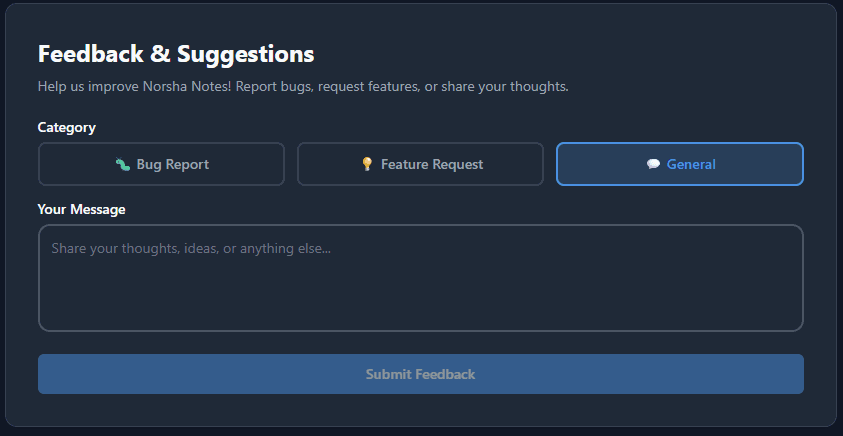
That's why there's a feedback box in Settings. If Nora gives you a wrong answer, if something feels off, if a feature isn't working the way you expected, tell me directly. You can submit a bug report, a feature request, or just general feedback. I read every single one and I'll do my best to fix it. That's the honest truth.
This is version one of something I think can get really good. Your feedback is what makes that happen.
Click to expand
Ready to try it
Upload your notes.
See what Nora builds.
Free to try. No credit card. Upload your first set of notes and ask her anything.
Start studying with Nora ←